TotalAV, examined: what an all-in-one security suite actually does — and what it cannot do
Advertising disclosure
This article contains partner links to TotalAV. If you take out a subscription after following one of them, CLEANING SERVICES HAIOSH s.r.o. receives a commission from the vendor. You pay exactly the same price as you would by going to the vendor directly.
The commission does not decide what this article says. The vendor did not see, review or approve this text before publication, and no payment was accepted in exchange for a conclusion. Our editorial policy explains the rules we work to, and the advertising disclosure explains the commercial arrangement in full.
Trademark notice: krasovin.online is an independent website. It is not affiliated with, endorsed by, sponsored by or otherwise connected to TotalAV, Protected.net or any other company named on this page. "TotalAV" and all other product names are the trademarks of their respective owners and are used here for identification only.
TotalAV sells one subscription that covers five jobs: scanning for malware, cleaning up a cluttered machine, tidying privacy traces, routing your traffic through a VPN and storing your passwords. This article explains what each of those parts really does, which of them you may already have for free, and the questions worth asking before you pay for any of them.
Security software is an unusually hard thing to shop for. You cannot test the product in the way that matters — by being attacked — and almost everything written about it online is written by someone who earns money when you buy. This page is no exception: we earn a commission if you subscribe through the links here, and we have said so above the fold, at the top of the page, and next to every button. What we can do is be precise about the mechanics, careful about the claims, and honest about the limits.
The short version
- What it is. One paid subscription bundling an antivirus engine, a device clean-up tool, privacy utilities, a VPN and a password manager under a single account.
- What it replaces. Three or four separate subscriptions — if you were actually paying for those separately. Many people were not.
- What you already have. Windows ships with Microsoft Defender Antivirus switched on; macOS ships with Gatekeeper and XProtect. Both browsers and operating systems also block known-malicious downloads.
- What decides the value. The renewal price, the plan's contents in your country, and the vendor's most recent independent lab results — in that order.
- What we will not tell you. That any product is guaranteed to stop everything. None is, and any page that says otherwise is selling you something.
What TotalAV is, and who stands behind it
TotalAV is a consumer security subscription sold for Windows, macOS, Android and iOS. The marketing name for this category is a "security suite": one installer, one account, one renewal date, several tools inside. It is sold directly to consumers online rather than through IT resellers, and it is positioned at people who want protection without configuration.
On the question of ownership, we will be careful, because this is exactly the sort of detail that gets repeated inaccurately across affiliate pages. TotalAV is published under the Protected.net brand umbrella. Beyond that, corporate structure, registered office and ownership change over time and are not something we can verify from the outside. The authoritative source is the legal notice and terms of service on TotalAV's own website, and where anything here differs from what the vendor publishes, the vendor's own information prevails.
A claim we removed. An earlier version of this page said TotalAV was "owned by a large, publicly listed company". We could not verify that, so it has been deleted rather than softened. See sources and corrections for the full list of changes.
What the five parts actually do
The single most useful thing you can do before buying any suite is to separate the bundle back into its parts and ask what each one is worth to you. They are not equally valuable, and they are not equally replaceable.
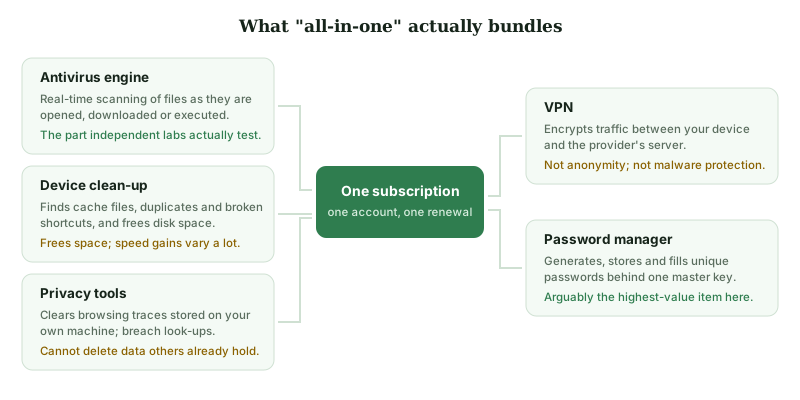
The antivirus engine is the part that does the work the category is named after, and the only part that independent laboratories test in a comparable way. The clean-up tool finds cache files, duplicates, leftovers from uninstalled programs and broken shortcuts. The privacy tools clear traces stored on your own machine and, on some plans, check whether an e-mail address of yours appears in a known data breach. The VPN encrypts the connection between your device and the provider's servers. The password manager generates and stores a different password for every account.
Plan contents differ by tier, by platform and by country, and vendors change them. Treat any feature list on a page like this one — including ours — as indicative, and check the vendor's own comparison table before paying.
How malware detection actually works
"Antivirus" is a misleadingly simple word for four different mechanisms working in sequence. Understanding them explains why lab scores differ between products, and why no product reaches 100 per cent.
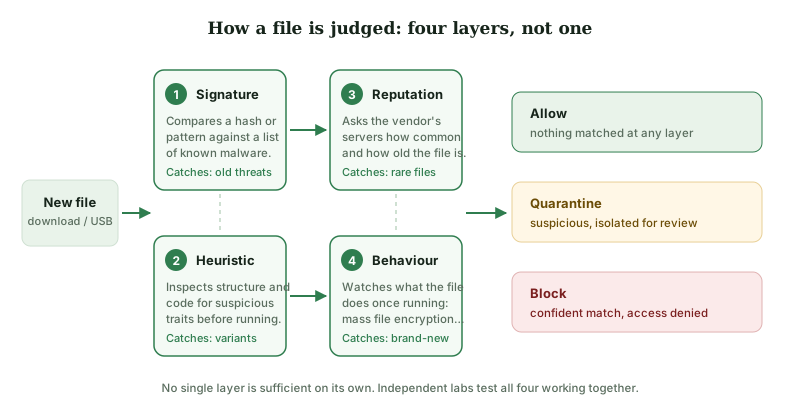
- Signature matching. The oldest method: compare the file against a list of fingerprints of known malware. Fast and precise, and useless against anything the vendor has not seen yet.
- Static heuristics. Inspect the file's structure and code for traits typical of malware — packing, obfuscation, suspicious imports — without running it. Catches variants of known families. Also the main source of false positives.
- Reputation and cloud lookup. Ask the vendor's servers how many other users have seen this exact file, and for how long. A binary signed by a well-known publisher and seen on millions of machines is treated differently from one that appeared an hour ago on three.
- Behavioural monitoring. Let the file run under observation and watch what it does: enumerating documents and encrypting them in bulk, writing to startup locations, injecting into other processes. This is the layer that stands a chance against something genuinely new, and the reason "real-time protection" is not a marketing phrase.
Two consequences follow. First, a product that scores well in a static file-detection test can still perform differently in a real-world test where the threat arrives through a browser — which is why the laboratories run both. Second, turning off real-time protection to stop a game stuttering removes the only layer that responds to new threats.
What you already have before you pay anything
This is the section that most pages in this genre leave out, and the one that most affects whether a subscription is worth it to you.
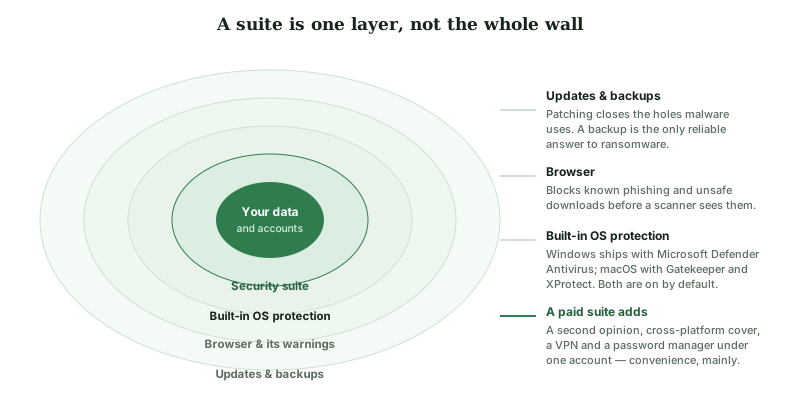
Current versions of Windows include Microsoft Defender Antivirus, enabled by default, with real-time protection, cloud-delivered protection and automatic updates delivered through Windows Update. It appears in the same independent laboratory test rounds as the commercial products. macOS includes Gatekeeper, which checks that applications are signed and notarised, and XProtect, Apple's built-in malware signature system, both on by default.
Browsers add another layer: Chrome, Edge, Firefox and Safari all check downloads and page addresses against reputation services and warn before you reach a known phishing page. And the plainest defence of all costs nothing: keeping the operating system, browser and applications patched, and keeping a backup that is not permanently connected to the machine. Ransomware is the one threat where a recent offline backup is worth more than any scanner.
None of this makes a paid suite pointless. It does mean the honest pitch for one is convenience and consolidation — cross-platform cover for a family's devices, a VPN and a password manager on the same bill, one interface for a person who will not otherwise open a security app — rather than "your computer is defenceless without it". It is not.
The VPN, described honestly
A VPN is the most over-promised item in any security bundle, so it is worth being exact. A VPN creates an encrypted tunnel from your device to a server run by the VPN provider. Traffic inside that tunnel is hidden from anyone on the network in between. Beyond the provider's server, traffic continues to its destination as normal.
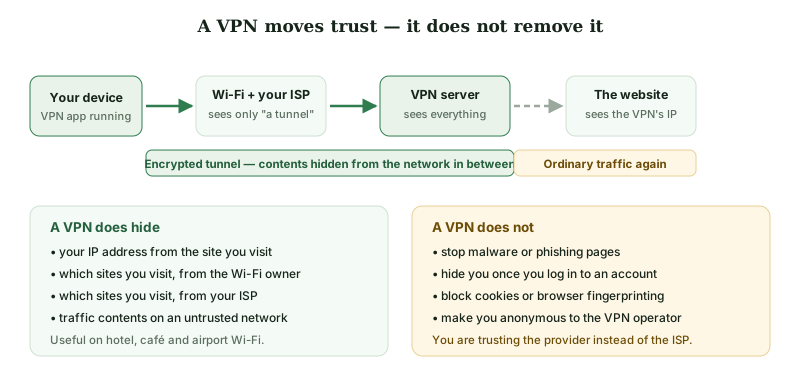
What that genuinely buys you: on hotel, airport or café Wi-Fi, the network operator and anyone else on the network can no longer see which sites you are reaching. Your home internet provider likewise sees a tunnel rather than a browsing history. The site you visit sees the VPN server's address instead of yours.
What it does not buy you: a VPN does not block malware, does not stop a phishing page from taking your password, and does not prevent cookies or browser fingerprinting. It does not make you anonymous — the moment you log into an account, you have identified yourself regardless of the tunnel. And it does not remove the need for trust: you are trusting the VPN operator with exactly the visibility you took away from your internet provider. That is a reasonable trade on a café network, and a much less obvious one at home.
The password manager is the underrated part of the bundle
If you asked us which component of a suite like this most reduces real-world risk for an ordinary household, it is not the scanner. It is the password manager — because the most common way ordinary people lose an account is not malware at all. It is credential stuffing: a password leaks in a breach at one site, and attackers replay the same e-mail-and-password pair automatically across hundreds of other services.
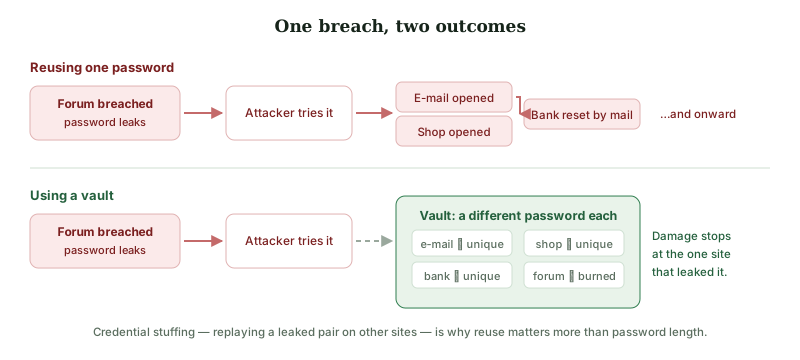
A vault fixes this by making reuse unnecessary. You remember one strong master passphrase; the manager generates and fills everything else. Two things are worth knowing before you rely on one. First, the master passphrase is genuinely irreplaceable — most vaults are designed so the provider cannot recover it, which is the point, and also the risk. Second, a password manager bundled inside a suite ties your vault to that subscription; think about how you would export it if you later stopped paying. Every reputable manager offers an export function, and checking that it exists before you commit is five minutes well spent.
Add two-factor authentication on your e-mail account while you are at it. Your e-mail is the reset channel for everything else, which is why the diagram above shows the attack ending there.
"Optimisation", examined rather than advertised
Every suite in this category includes a clean-up tool, and the claims made for these tools are usually the weakest part of the marketing. Here is what they actually do and what to expect.
Disk space: real. Browser caches, installer leftovers, old update files, duplicate downloads and log files genuinely accumulate, and a clean-up pass genuinely frees space. How much depends entirely on the machine — we are not going to quote a figure, because any specific number ("frees several gigabytes") is a claim about your computer that nobody can make from here. Windows has a built-in equivalent in Storage Sense and Disk Cleanup; macOS has Storage Management.
Speed: usually modest, occasionally real. Where a clean-up tool helps measurably, it is normally by trimming the list of programs that start automatically with the machine, not by deleting temporary files. On a system with a solid-state drive and adequate memory, deleting cache files rarely produces a difference you can feel. On an older machine with a nearly-full mechanical disk, freeing space can help.
Registry cleaning: treat claims sceptically. Microsoft's own guidance has long been that it does not support the use of registry-cleaning utilities in Windows, and there is no credible published evidence that removing orphaned registry entries speeds up a modern PC. This is a feature we would not pay extra for, in any product.
How to read independent laboratory results
Three laboratories publish comparable consumer antivirus testing: AV-TEST in Germany, AV-Comparatives in Austria and SE Labs in the United Kingdom. Their public reports are free to read, and they are the only evidence in this market that is not written by a vendor or an affiliate.
Four things to keep in mind when you look at them:
- Check the date. Results age quickly. A certificate from three years ago tells you little about the current engine.
- Check that the product was actually in the round. Participation is voluntary and vendors choose which tests to enter. A product missing from a table has not failed it — it was not in it. This cuts both ways, and it is why we do not reproduce scores here.
- Read the false-positive column. A product that blocks everything, including your accounting software, is not a good product.
- Prefer "real-world" tests over static file-detection tests: they run the whole chain, from the web page to the payload, which is how infections actually arrive.
We deliberately publish no star rating and no score of our own for TotalAV or for anything else. We have not run a laboratory-grade comparative test, and inventing a number to look authoritative is precisely the practice our editorial policy forbids.
Before you buy: the four dates that matter
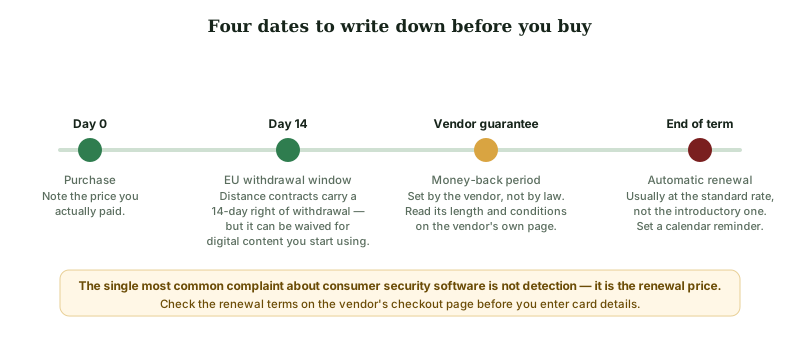
The introductory price is not the price. Consumer security software is almost universally sold with a heavily discounted first term followed by automatic renewal at a standard rate. This is legal and disclosed, and it is also the single most common source of complaints in the category. Before entering card details, find the renewal terms on the vendor's checkout page, note the renewal amount and date, and put a reminder in your calendar a week before it.
Know your two separate rights. They are often confused:
- Under EU consumer law (Directive 2011/83/EU on consumer rights, as implemented in each member state), distance contracts carry a 14-day right of withdrawal. For digital content and services there is an important exception: if you expressly ask for performance to begin immediately and acknowledge that you lose the right of withdrawal, it can fall away. Read the checkbox you are ticking.
- The vendor's own money-back guarantee is a commercial promise, not a legal right. Its length and conditions are whatever the vendor's terms say — check them on the vendor's site, not on ours.
Count your devices honestly before choosing a tier, and check that the platforms you actually use are covered at that tier. Mobile versions of security suites are generally more limited than desktop ones, for reasons imposed by the mobile operating systems themselves rather than by the vendor.
Telling a real alert from a scam
An unfortunate side effect of this market is that criminals imitate it. If you take one practical thing from this article, make it this.
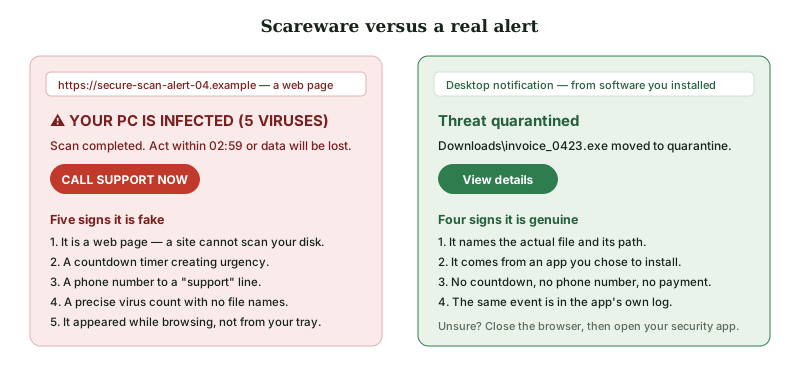
A web page cannot scan your hard disk. Any "virus scan" that appears inside a browser window, counts threats, starts a countdown and offers a telephone number is a scam, whatever logo it is wearing. A genuine alert comes from software you installed, names the specific file, appears in that software's own log, and never asks you to telephone anyone. When in doubt, close the browser entirely, then open your security software yourself from the Start menu or menu bar and look at its history.
Who a bundle like this suits — and who it does not
It makes sense if you are covering several people's devices across Windows, macOS, Android and iOS and want one bill and one account; if you would otherwise pay separately for a VPN and a password manager; or if you are setting up protection for someone who will never open a configuration screen and needs the simplest possible interface.
It makes less sense if you are comfortable with the protection already built into your operating system and would rather choose a dedicated password manager and a dedicated VPN on their own merits; if you need enterprise features such as central management, policy control or endpoint detection and response; or if you are buying mainly for the clean-up tool, which is the least substantial part of the package.
Neither answer is a moral failing. This is a convenience purchase in a market where convenience is worth something to some households and nothing to others.
Sources, corrections and how this page is maintained
Where a statement here concerns TotalAV specifically — plan contents, prices, guarantee terms, supported platforms, corporate details — the vendor's own published information prevails over anything on this page. We do not control it, and it changes.
Sources consulted
- AV-TEST Institute, public consumer test reports — av-test.org
- AV-Comparatives, public consumer main-test series — av-comparatives.org
- SE Labs, public home anti-malware protection reports — selabs.uk
- Microsoft documentation on Microsoft Defender Antivirus in Windows — learn.microsoft.com
- Apple Platform Security guide, on Gatekeeper and XProtect — support.apple.com
- Directive 2011/83/EU on consumer rights (right of withdrawal and its digital-content exception) — eur-lex.europa.eu
- ENISA, consumer-facing guidance on basic cyber hygiene — enisa.europa.eu
- TotalAV's own website, for plan contents, pricing and legal terms.
Corrections made to this page
This page replaced an earlier version. The following claims were removed or rewritten because they could not be substantiated:
- The earlier text presented the article as a "reader story" and "reader-submitted". It was not. It now carries a named byline and a publication date.
- "Owned by a large, publicly listed company" — removed, unverifiable from public sources at the time of writing.
- "It can free up several gigabytes" — removed; the amount depends entirely on the individual machine.
- "The VPN covers a reasonable number of countries and does not throttle speeds in any noticeable way" — removed; we have run no such measurement.
- "Can remove personal data from data-broker sites" — removed; we could not confirm this is a feature of the product, and it is a materially different service from clearing local traces.
- "Backed by independent lab testing" as a bare assertion — replaced with an explanation of how to check the laboratories' current published results yourself.
- "Cheaper than buying the tools separately" — qualified; this depends on which tools you would otherwise have bought and at what price.
- "TotalAV is currently running a limited-time offer" — removed as artificial urgency. We do not use countdowns or scarcity claims.
Corrections policy
If you find an error on this page, write to info@krasovin.online and set out what is wrong. We correct factual errors promptly and note significant corrections in this section with the date. The full procedure is in our editorial policy.
Not financial, legal or security advice. This article is general information about a category of consumer software. It is not a recommendation tailored to your circumstances, and no outcome is guaranteed by any product described here.